How to create a permanent "alias"? [duplicate]
If you create an alias for example:
alias cls="clear"It exists untill you kill terminall session. When you start a new terminal window the alias doesn't exist any more. How to create "permanent" alias, one that exists in every terminal session?
15 Answers
You can put such aliases in the ~/.bash_aliases file.
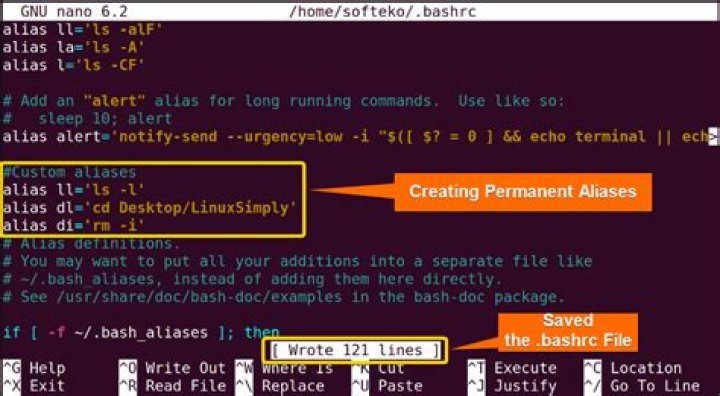
That file is loaded by ~/.bashrc. On Ubuntu 10.04, the following lines need to be uncommented to enable the use of ~/.bash_aliases. On Ubuntu 11.04 and later, it's already enabled:
if [ -f ~/.bash_aliases ]; then . ~/.bash_aliases
fi
The aliased command will be available on any new terminal. To have the aliased command on any existing terminal one need to source ~/.bashrc from that terminal as,
source ~/.bashrcAdd your line into ~/.bashrc or into ~/.profile / ~/.bash_profile for remote logins.
If you want the command being executed for all users, put it into /etc/bash.bashrc.
Edit: In the latest versions of Ubuntu, ~/.bashrc automatically sources ~/.bash_aliases, so permanent aliases are best put into this file instead.
You can add the function below to your .bashrc file.
function permalias ()
{ alias "$*"; echo alias "$*" >> ~/.bash_aliases
}
Then open a new terminal or run source ~/.bashrc in your current terminal. You can now create permanent aliases by using the permalias command, for example permalias cls=clear.
See for the difference between ~/.bash_profile and ~/.bashrc
~/.bashrc is run every time you open a new terminal, whereas ~/.bash_profile isn't. ~/.bashrc contains the following, which includes the ~/.bash_aliases file. This would be the most appropriate place to add your alias.
# Alias definitions.
# You may want to put all your additions into a separate file like
# ~/.bash_aliases, instead of adding them here directly.
# See /usr/share/doc/bash-doc/examples in the bash-doc package.
if [ -f ~/.bash_aliases ]; then . ~/.bash_aliases
fi
Stick that command in the last line of your ~/.bash_profile


