How to Concatenate user name and surname while adding users from csv?
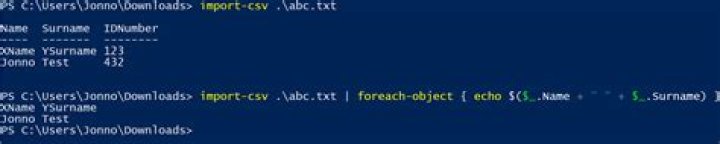
I want to add users to AD using the following command in Powershell: (This is a single line command but I am breaking apart it to be more readable)
import-csv C:\list.csv |
Foreach-Object { New-ADUser -Name ([string]::Concat($_.Name , " " , $_.Surname)) -GivenName $_.Name -Surname $_.Surname -UserPrincipalName $_.IDNumber -SamAccountName $_.IDNumber -AccountPassword (ConvertTo-SecureString $_.IDNumber -AsPlainText -force) -Description $_.UnitName -DisplayName ([string]::Concat("'", $_.Name , " " , $_.Surname, "'")) -ChangePasswordAtLogon $true -Enabled $True -Path ([string]::Concat("OU=" , $_.Group , ",DC=mydomain,DC=local"))
}
When I run the command I get a "bad syntax" error.
New-ADUser : The object name has bad syntax At C:\addUsers.ps1:6 char:5 + New-ADUser -Name ([string]::Concat($.Name , " " , $.Surname)) -GivenName $_.A ... + ~~~~~~~~~~~~~~~~~~~~~~~~~~~~~~~~~~~~~~~~~~~~~~~~~~~~~~~~~~~~~~~~~~~~~~~~~~~~~~~~
CategoryInfo : NotSpecified: (CN=JOHN WAYNE,OU=,DC=mydomain,DC=local:String) [New-ADUser], ADException
FullyQualifiedErrorId : ActiveDirectoryServer:8335, Microsoft.ActiveDirectory.Management.Commands.NewADUser
Since I am new to Active Directory and Powershell I thought it is best to ask here for a guidance.
1 Answer
Try the following:
-Name $($_.Name + " " + $_.Surname)I don't have the cmdlet to test it with, but this should concatenate the first and last name with a space between.


