How to boot from DVD Lenovo W540
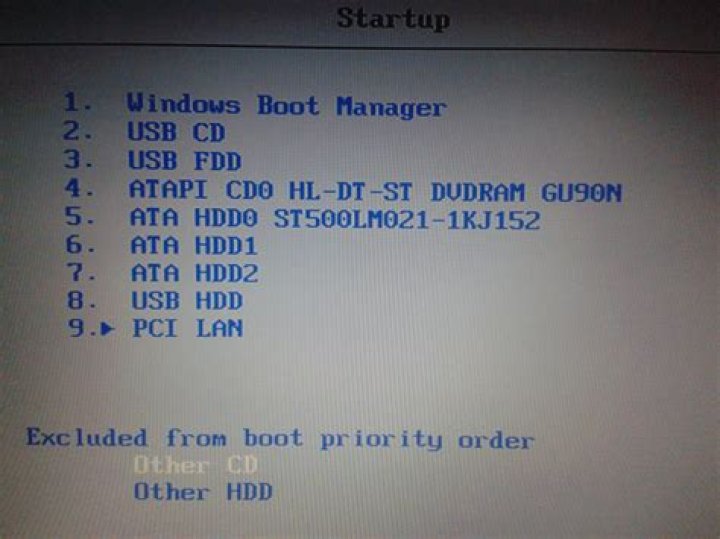
I have a Lenovo W540 laptop currently running windows 8.1. I have burned an ISO image of a linux-based OS onto a DVD-R using the Mastered burn type (not live file system). I cannot figure out how to get my laptop to boot from this disk. Within the BIOS settings, I have disabled secure boot.
I do not want to install this OS onto my computer, I want to boot it from the disk every time.
Below is an image of the boot order in the BIOS. Would one of those work? I already tried "USB CD
3 Answers
- Make sure to select Legacy Boot or UEFI in the BIOS depending on the type you want to boot.*
- Select ATAPI CD0 HL-DT-ST DVDRAM GU90N in that list.
- Alternatively, put that entry first in the BIOS to automatically boot to it.
If it doesn't work, there may be a problem with your installation medium.
(* For Linux it likely is Legacy Boot that you want.)
4Set the DVDRAM device as the boot device. Are you certain the iso you downloaded is a live cd? It could be an install only disk.
1Your quote "I do not want to install this OS onto my computer, I want to boot it from the disk every time." Well, then the ISO is not for you. I believe the ISO will go through the installation process each time. What you want is a Linux Live CD. The Live CD has everything you need and loads a fresh environment each time you boot into it. If you need it to save things in your Linux environment, you should consider making a dual boot system, or use a virtual environment in Windows.
To answer your question, you would choose boot option #4 ATAPI CD0 HL-DT-ST DVDRAM GU90N


