How does a person create a section group hierarchy in OneNote?
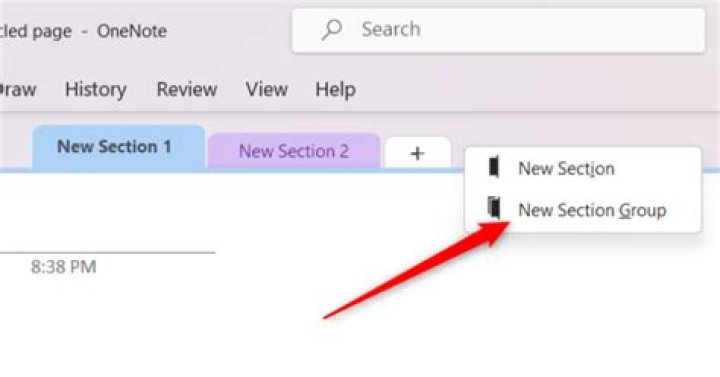
I can create a new section fine in OneNote.
I can create a new page fine in OneNote.
I am wondering how I create a new section group?
It seems to be a bit obscure ..
Online help mentions Ctrl+Shift+G and Shift+f10, these didn't seem to work for me.
Ah - I think I have worked it out:
I have to right click the "+ Add section" button (bottom left) ..
That's not so easy to work out and find !
I wonder why they (MS) removed this function/option from the right click menu options as per previously documented in older MS doco ? I see there is a "feedback" option to MS .. I will suggest that option for add new section group be put back in the right click options.
See this image on how to do this:
Is there any other way to create section groups ? Maybe usage of section groups is being discouraged ?
1 Answer
In OneNote which comes with the latest Office 365, the function is on context menu of any section tab:
Similarly, I can select the command using keyboard sequence:
- Ctrl+Shift+G (focuses current section tab)
- Shift+F10 (opens context menu), or just single press of menu key a.k.a. AppsKey
- G (selects item New Section Group – see underlined G on the above image)


