How do I use graphics.h in Ubuntu?
Is there any Linux based compiler which supports graphics.h library?
I want to implement graphic programs, so please kindly let me know if there is any such software.
If not then how can I use it?
62 Answers
There are several option available to do graphics programming using Ubuntu.
Using SDL
If you want to use graphics.h on Ubuntu platform you need to compile and install libgraph. It is the implementation of turbo c graphics API on Linux using SDL.
It is not very powerful and suitable for production quality application, but it is simple and easy-to-use for learning purpose.
You can download it from here.
First add the Universe repository (since some required packages are not available in main repository):
sudo add-apt-repository universe
sudo apt-get update
Second install build-essential and some additional packages:
For versions prior to 18.04:
sudo apt-get install libsdl-image1.2 libsdl-image1.2-dev guile-1.8 \
guile-1.8-dev libsdl1.2debian libart-2.0-dev libaudiofile-dev \
libesd0-dev libdirectfb-dev libdirectfb-extra libfreetype6-dev \
libxext-dev x11proto-xext-dev libfreetype6 libaa1 libaa1-dev \
libslang2-dev libasound2 libasound2-dev build-essential
For 18.04: From Ubuntu 18.04
guile-2.0works andlibesd0-devis deprecated. For this you need to add repositories ofxenialinsources.list.sudo nano /etc/apt/sources.listAdd these lines:
deb xenial main universe
deb-src xenial main universe
Run
sudo apt-get update. Then install packages using:sudo apt-get install libsdl-image1.2 libsdl-image1.2-dev guile-2.0 \ guile-2.0-dev libsdl1.2debian libart-2.0-dev libaudiofile-dev \ libesd0-dev libdirectfb-dev libdirectfb-extra libfreetype6-dev \ libxext-dev x11proto-xext-dev libfreetype6 libaa1 libaa1-dev \ libslang2-dev libasound2 libasound2-dev
Now extract the downloaded
libgraph-1.0.2.tar.gzfile.Go to the extracted folder and run the following command:
./configure
make
sudo make install
sudo cp /usr/local/lib/libgraph.* /usr/lib
Now you can use
#include<graphics.h>on Ubuntu and the following line in your program:int gd=DETECT,gm; initgraph(&gd,&gm,NULL);
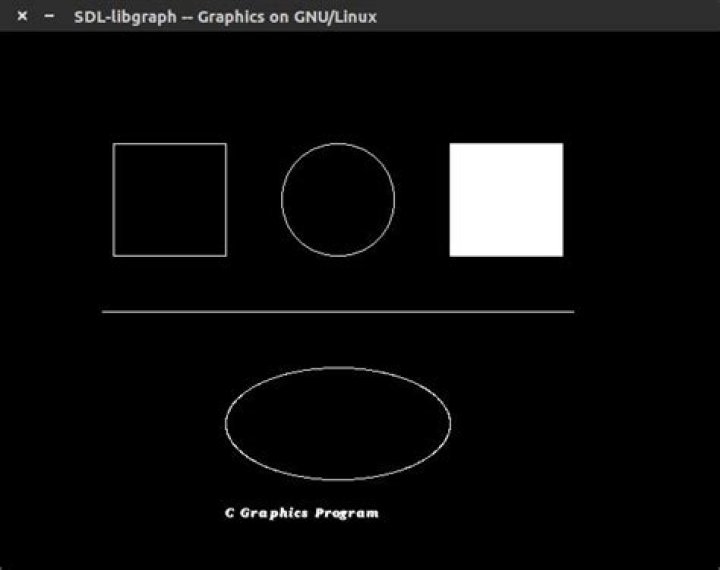
Here is a sample program using graphics.h:
/* demo.c */
#include <graphics.h>
int main()
{ int gd = DETECT,gm,left=100,top=100,right=200,bottom=200,x= 300,y=150,radius=50; initgraph(&gd,&gm,NULL); rectangle(left, top, right, bottom); circle(x, y, radius); bar(left + 300, top, right + 300, bottom); line(left - 10, top + 150, left + 410, top + 150); ellipse(x, y + 200, 0, 360, 100, 50); outtextxy(left + 100, top + 325, "C Graphics Program"); delay(5000); closegraph(); return 0;
}
To compile it use
gcc demo.c -o demo -lgraphTo run type
./demo
Using OpenGL (via GLUT)
Although OpenGL is basically made for 3D programming, drawing 2D shapes gives the basic outline and introduction to OpenGL and gives the idea about how to start drawing objects in OpenGL.
- To install GLUT, open terminal and type
sudo apt-get install freeglut3-dev. - Here is a simple graphics program using GLUT
/* demo.c */
#include <GL/gl.h>
#include <GL/glut.h>
#include <GL/glu.h>
void setup() { glClearColor(1.0f, 1.0f, 1.0f, 1.0f); }
void display() { glClear(GL_COLOR_BUFFER_BIT | GL_DEPTH_BUFFER_BIT); glColor3f(0.0f, 0.0f, 0.0f); glRectf(-0.75f,0.75f, 0.75f, -0.75f); glutSwapBuffers(); }
int main(int argc, char *argv[]) { glutInit(&argc, argv); glutInitDisplayMode(GLUT_RGB | GLUT_DEPTH | GLUT_DOUBLE); glutInitWindowSize(800,600); glutCreateWindow("Hello World"); setup(); glutDisplayFunc(display); glutMainLoop(); return 0; }
Compile it using
gcc demo.c -o demo -lglut -lGL
Run it using
./demo
If you want to use graphics.h in ubuntu or any other linux distro, then I prefer libxbgi. It can do almost all the things that you expect from the graphics.h for windows. You can download it from here:
Otherwise if you want to do some high end graphics then you are there for SDL(which is mostly for programming video games) and OpenGL(which is for 3D graphics). You can also use a mixture of the two. One example is the game briquolo(spelling may be wrong).
HAPPY GRAPHICS PROGRAMMING!!


