How do I open a PDF file at a specific zoom percentage?
Everytime I open a PDF file it opens up in PDF Complete 4.0.9 Special Edition (came pre-installed) at a very high zoom-view (like 274%) and I have to minimize the zoom for EVERY single PDF I open. The font is always too large to read. Is there anyway to set-up the PDF program to open up PDF files at a lower zoom permanently?
Also, I have SumatraPDF which I hate cause the search feature doesn't work. So, please don't suggest using that program. I want to use programs that are fully functional. Also, I'm open to buying PDF editors/readers etc. to solve this problem.
Windows 7 64-bit. IE 8.
34 Answers
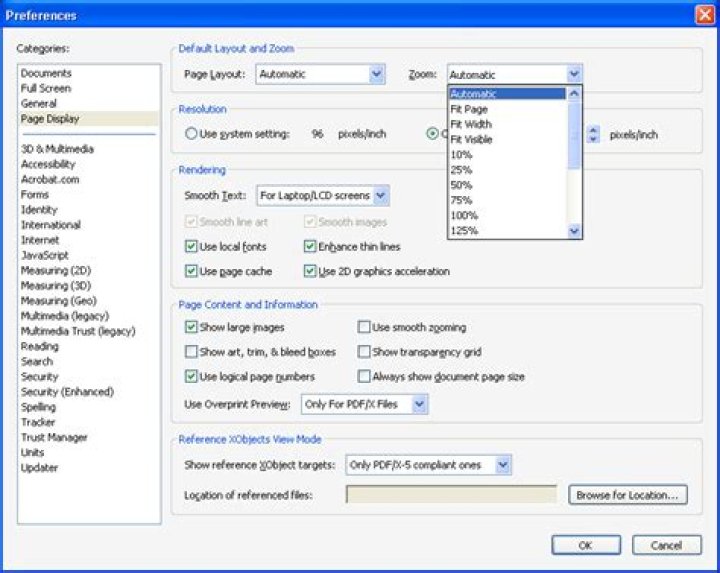
In Adobe Reader you can set this as follows:
Edit Menu, Preferences...
Select the Page Display category
From here you can set the default Zoom. Automatic, Fit Width or 100% are probably the best options to try.
My recommendation is the free Foxit Reader.
This is the fastest PDF reader I know, and Page Display is one of its options in Preferences :
In Adobe Reader you can select to open documents in last zoom level and at last opened page under Documents tab:
Since xpdf is open source, it should be available for windows, too. You can tell it which zoom level to use:
-z zoom Set the initial zoom factor. A number specifies a zoom percentage, where 100 means 72 dpi. You may also specify ´page', to fit the page to the window size, ´width', to fit the page width to the window width, or ´height', to fit the page height to the window height. [config file: ini‐ tialZoom; or X resource: xpdf.initialZoom]So your starter could include this flag.
I want to use programs that are fully functional.
I don't know what is meant with that. xpdf is very fast, so maybe it isn't.
1

