How do I configure my DNS settings in Ubuntu server?
According to this page it appears to be simple. However, /etc/bind does not exist on the default installation of Ubuntu 12.04.3 LTS server.
So, without installing any further software, how can configure DNS and remove dnsmasq on ubuntu server? I am quite familiar with sudo & nano.
5 Answers
Set DNS Servers
You need to configure the /etc/network/interfaces file if you want to change your DNS server via the command line.
It should look something like this:
# The loopback network interface
auto lo
iface lo inet loopback
# The primary network interface
auto eth0
iface eth0 inet static
address 192.168.X.X
netmask 255.255.255.0
gateway 192.168.X.X
dns-nameservers X.X.X.X
If you have more than one DNS server, just add a space between each:
dns-nameservers X.X.X.X Y.Y.Y.Y Z.Z.Z.ZJust replace the Xs, Ys, and Zs with your own IPs of the DNS servers of choice, and when this is done, run this command to update the settings:
sudo ifdown eth0 && sudo ifup eth0Hope this helps!
13However if you are on newer Ubuntu version, you might be using resolvconf (a package that manages the contents of /etc/resolv.conf).
In order to set dns-nameservers which won't be removed after reboot add them in
sudo nano /etc/resolvconf/resolv.conf.d/base like
nameserver x.x.x.x
nameserver x.x.y.y
And afer that just do
sudo resolvconf -uAs of 20.04 Focal Fossa, Ubuntu Server uses systemd-resolved to manage nameserver configuration. /etc/resolv.conf is a static file and should not be edited.
To configure your resolver, you set it in your netplan configuration file, like this:
network: version: 2 renderer: networkd ethernets: enp0s25: addresses: - 192.168.0.100/24 gateway4: 192.168.0.1 nameservers: search: [mydomain, otherdomain] addresses: [1.1.1.1, 8.8.8.8, 4.4.4.4]For more information on how to use the netplan system, see the Ubuntu article on network configuration.
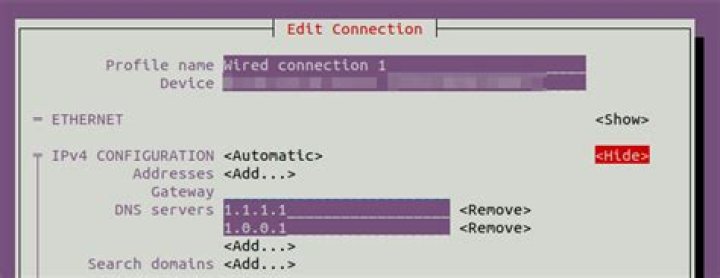
NetworkManager TUI: nmtui
Beside this alternative using nmcli connection edit you might like a more ncurses approach with nmtui, the GNOME's CLITUI alternative to nm-connection-editor.
Note: This anwer is more related to Ubuntu Desktop, but since the suitable question was marked as duplicate of this one (incorrectly, IMO) I post it here.
1I use ubuntu 20.04 and unfortunately non of the other answers worked for me so I share the way I fixed this problem
first install resolvconf if not installed
sudo apt update
sudo apt install resolvconf
check resolvconf service started and enabled
sudo systemctl status resolvconf.serviceif service is not enabled you can start and enable it with :
sudo systemctl start resolvconf.service
sudo systemctl enable resolvconf.service
now edit resolv.conf.d/head configuration file
sudo nano /etc/resolvconf/resolv.conf.d/headadd your DNS addresses to this file for example I use (8.8.8.8 and 8.8.4.4)
nameserver 8.8.8.8
nameserver 8.8.4.4
now force resolvconf to run update scripts when invoked with -u
sudo resolvconf --enable-updates now run updates
sudo resolvconf -unow if you check cat /etc/resolv.conf you must see your DNS configuration in this file if not try these commands and check again
sudo systemctl restart resolvconf.service
sudo systemctl restart systemd-resolved.service
Resources:


