How can I solve the printer status problem "Backend /usr/lib/cups/backend/lpd does not exist!"?
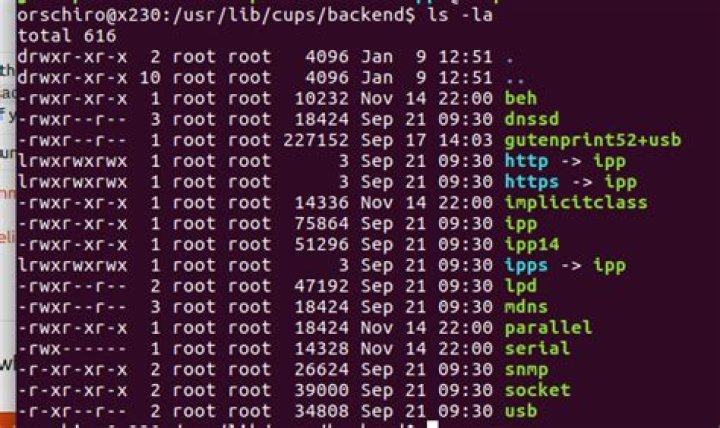
While trying to print a PDF document with Evince PDF reader, I encounter the following status error message:
Related information:
error_log:
orschiro@x230:~$ cat /var/log/cups/error_log
E [09/Jan/2017:12:24:13 +0100] Filter \"rastertopwg\" not found.
E [09/Jan/2017:12:24:13 +0100] Filter \"gstopdf\" not found.
E [09/Jan/2017:12:24:13 +0100] Filter \"gstoraster\" not found.
E [09/Jan/2017:12:24:13 +0100] Filter \"gstoraster\" not found.
E [09/Jan/2017:12:24:13 +0100] Filter \"gstoraster\" not found.
E [09/Jan/2017:12:24:13 +0100] Filter \"texttopdf\" not found.
E [09/Jan/2017:12:24:13 +0100] Filter \"texttopdf\" not found.
E [09/Jan/2017:12:24:13 +0100] Filter \"texttopdf\" not found.
E [09/Jan/2017:12:24:13 +0100] Filter \"texttopdf\" not found.
E [09/Jan/2017:12:24:13 +0100] Filter \"texttopdf\" not found.
E [09/Jan/2017:12:24:13 +0100] Filter \"texttopdf\" not found.
E [09/Jan/2017:12:24:13 +0100] Filter \"bannertopdf\" not found.
E [09/Jan/2017:12:24:13 +0100] Filter \"urftopdf\" not found.
E [09/Jan/2017:12:24:13 +0100] Filter \"imagetoraster\" not found.
E [09/Jan/2017:12:24:13 +0100] Filter \"imagetoraster\" not found.
E [09/Jan/2017:12:24:13 +0100] Filter \"imagetoraster\" not found.
E [09/Jan/2017:12:24:13 +0100] Filter \"imagetoraster\" not found.
E [09/Jan/2017:12:24:13 +0100] Filter \"imagetoraster\" not found.
E [09/Jan/2017:12:24:13 +0100] Filter \"imagetoraster\" not found.
E [09/Jan/2017:12:24:13 +0100] Filter \"imagetoraster\" not found.
E [09/Jan/2017:12:24:13 +0100] Filter \"imagetoraster\" not found.
E [09/Jan/2017:12:24:13 +0100] Filter \"imagetoraster\" not found.
E [09/Jan/2017:12:24:13 +0100] Filter \"imagetoraster\" not found.
E [09/Jan/2017:12:24:13 +0100] Filter \"imagetoraster\" not found.
E [09/Jan/2017:12:24:13 +0100] Filter \"imagetoraster\" not found.
E [09/Jan/2017:12:24:13 +0100] Filter \"imagetoraster\" not found.
E [09/Jan/2017:12:24:13 +0100] Filter \"imagetoraster\" not found.
E [09/Jan/2017:12:24:13 +0100] cupsdLoadBanners: Unable to open banner directory "/usr/share/cups/banners": No such file or directory
E [09/Jan/2017:12:24:13 +0100] Canon-MG5100-series: File \"/usr/lib/cups/filter/rastertogutenprint.5.2\" not available: No such file or directory
access_log:
orschiro@x230:~$ cat /var/log/cups/access_log
localhost - - [09/Jan/2017:12:24:13 +0100] "POST / HTTP/1.1" 200 349 Create-Printer-Subscriptions successful-ok
localhost - - [09/Jan/2017:12:24:13 +0100] "POST / HTTP/1.1" 200 176 Create-Printer-Subscriptions successful-ok
localhost - - [09/Jan/2017:12:51:35 +0100] "POST / HTTP/1.1" 401 123 Cancel-Subscription successful-ok
localhost - root [09/Jan/2017:12:51:35 +0100] "POST / HTTP/1.1" 200 123 Cancel-Subscription successful-ok
localhost - - [09/Jan/2017:12:51:35 +0100] "POST / HTTP/1.1" 200 152 Cancel-Subscription successful-ok
localhost - - [09/Jan/2017:12:51:35 +0100] "POST / HTTP/1.1" 200 349 Create-Printer-Subscriptions successful-ok
localhost - - [09/Jan/2017:12:51:35 +0100] "POST / HTTP/1.1" 200 176 Create-Printer-Subscriptions successful-ok
localhost - - [09/Jan/2017:12:51:35 +0100] "POST / HTTP/1.1" 200 3581078 CUPS-Get-PPDs -
localhost - - [09/Jan/2017:12:52:09 +0100] "POST /printers/XeroxP2 HTTP/1.1" 200 174207 Print-Job successful-ok
localhost - - [09/Jan/2017:13:47:50 +0100] "POST / HTTP/1.1" 401 123 Cancel-Subscription successful-ok
localhost - root [09/Jan/2017:13:47:50 +0100] "POST / HTTP/1.1" 200 123 Cancel-Subscription successful-ok
localhost - - [09/Jan/2017:13:47:50 +0100] "POST / HTTP/1.1" 200 152 Cancel-Subscription successful-ok
localhost - - [09/Jan/2017:13:48:13 +0100] "POST / HTTP/1.1" 200 349 Create-Printer-Subscriptions successful-ok
localhost - - [09/Jan/2017:13:48:15 +0100] "POST / HTTP/1.1" 200 176 Create-Printer-Subscriptions successful-ok1 Answer
Go into Print Settings, open the printer's properties, and click 'Enable'. It's such a crazy error message!


