How can I find my DHCP server?
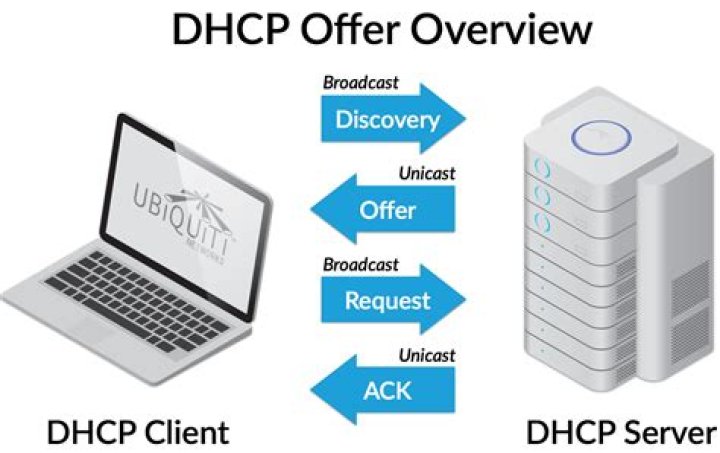
On my LAN there are multiple DHCP servers running, and all of them are on the same range.
Now I use a machine which has a dynamic IP address from a DHCP server. I have to know from which server it comes.
How to do that?!
4 Answers
To find out the DHCP server that's giving you the IP, just press Ctrl+Alt+T on your keyboard to open Terminal. When it opens, run the command(s) below:
cat /var/lib/dhcp3/dhclient.leasesOr you can just use grep command to get DHCP server address.
grep dhcp-server-identifier /var/lib/dhcp3/dhclient.leasesOR
grep dhcp-server-identifier /var/lib/dhcp/dhclient.leasesFor Ubuntu 14.04, 16.04, and 17.10 you can use:
dhclient -d -nw eth0Sample output:
Internet Systems Consortium DHCP Client 4.2.4
Copyright 2004-2012 Internet Systems Consortium.
All rights reserved.
For info, please visit
Listening on LPF/eth0/00:0c:29:49:3e:67
Sending on LPF/eth0/00:0c:29:49:3e:67
Sending on Socket/fallback
DHCPDISCOVER on eth0 to 255.255.255.255 port 67 interval 3 (xid=0x4f723f9)
DHCPREQUEST of 192.168.138.136 on eth0 to 255.255.255.255 port 67 (xid=0x4f723f9)
DHCPOFFER of 192.168.138.136 from 192.168.138.254
DHCPACK of 192.168.138.136 from 192.168.138.254
RTNETLINK answers: File exists
bound to 192.168.138.136 -- renewal in 892 seconds.In Ubuntu 14.04, the /var/lib/dhcp/dhclient.leases is empty. The actual lease file can be found on the command line of dhclient via ps. Look for the -lf option. This command should work in Ubuntu 14.04 installations (still valid as of 17.10):
cat $(ps aux | grep -o '[/]var/lib/NetworkManager/\S*.lease') | grep dhcp-server-identifierWith:
sudo nmap --script broadcast-dhcp-discover -e eth0 # DHCPv4 sudo nmap --script broadcast-dhcp6-discover -6 # DHCPv6sudo dhcpdump -i eth0sudo tcpdump -i eth0 -nev udp port 68
Others:
dhcp_probe(dhcp-probepackage)
In Ubuntu 16.04 you can try
journalctl | grep DHCPACK

