Free Standby Memory without a Reboot
Does anyone know of a way to clear standby memory without a reboot?
I can't launch my HyperV VMs after doing other tasks in Win 10 after running tasks due to the lack of free memory. I would have enough memory (free + standby), but HyperV doesn't seem to count the standby RAM as available for the VM.
4 Answers
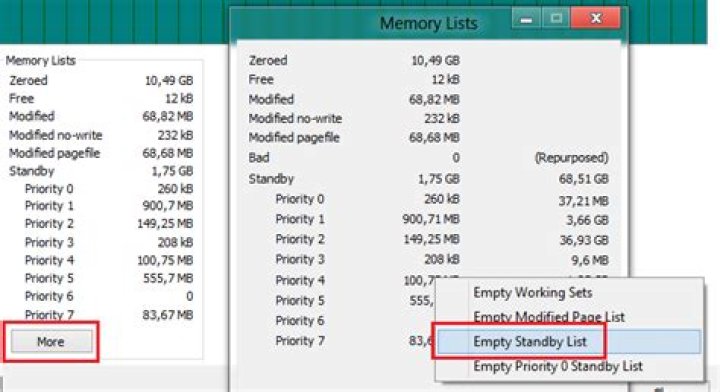
Run ProcessHacker as admin, click on View->System Information->Memory->Memory Lists->More and select here Empty Standby List under the entry empty:
You can use RAMMap v1.5 ()
- Download RamMap from Microsoft Windows Sysinternals.
- Run RamMap (installation is not required).
- Wait until UseCounts shows the memory map.
- On the Menu Strip, indentify the Empty menu item. Click on it and choose Empty
- Standby List from the dropdown menu. Press F5 to update the Use Counts tab or check the memory tab on the Windows Resource Monitor to check that the Standby Memory has been released.
Source:
I may be too late, but since no one has mentioned Empty Standby List command line, I thought of including it here.
I am using Empty Standby List
Then I created a batch file which will automatically clear the standby memory every 5 minutes = 300 seconds (which can be adjusted to your own liking). I will let this run on the background (run as admin as well). This works with my Windows 7 Professional x64.
:loop
echo Clearing...
EmptyStandbyList.exe standbylist
timeout 300
cls
goto loop
EDIT: Removed unnecessary " that was causing batch file to fail
i found an automatic tool for that
1

