fixing a heavily fragmented HDD
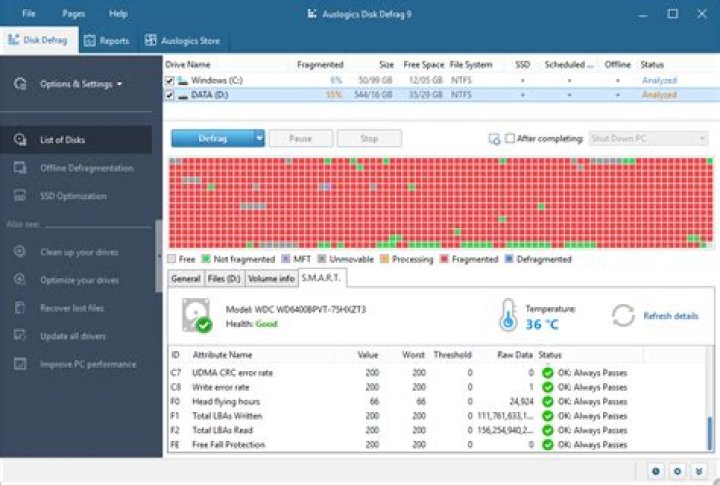
on my laptop I have a ssd(ubuntu) and hdd(windows10 +storage). my main OS is the ubuntu and I use windows mostly for games.
the hdd acted really slow so I checked it and windows defragmantation tool reported that it's 24% fragmented. when I run the optimization I just run to consolidating twice and doesn't defrag it.
then I checked with auslogic disk defrag and got this horrible result of 55% fragmantation! It literally shows all disk block as red(fragmented).
what should I do with it? Is the difference normal?
1 Answer
Different tools given different analysis results is normal.
Especially 3rd party (non-Microsoft) tools always seem to give a worse defrag report than the Microsoft tools. Maybe they need to justify their own existence...
Some fragmentation is to be expected, but if it gets above 15% to 20% it is usually time for a defrag.
(On a HDD that is. NEVER defrag a SSD. A SSD mostly doesn't care about fragmentation anyway and doing one can be really bad for the life-expectancy of the SSD.)
I would strongly recommend to do any defrag from within Windows using the Microsoft tools. Windows 10 does all sort of funky things with temp-files, disk-caching and hybrid hibernation. The Microsoft tools are aware of that and take it into account. 3rd party tools might just make matters worse, because they can attempt to optimize files in ways that go contrary to what Windows wants to do.
Additional remark: Don't stuff a relatively small filesystem too full. Nearly full filesystems, especially if they are the C: drive, fragment quicker and with a lot more performance impact.
My rule of thumb: Leave at least 10% free if possible. (On filesystems > 1TB leaving 100 GB is enough.)


