FileZilla single file transfer speed slowed down (it was fast before)
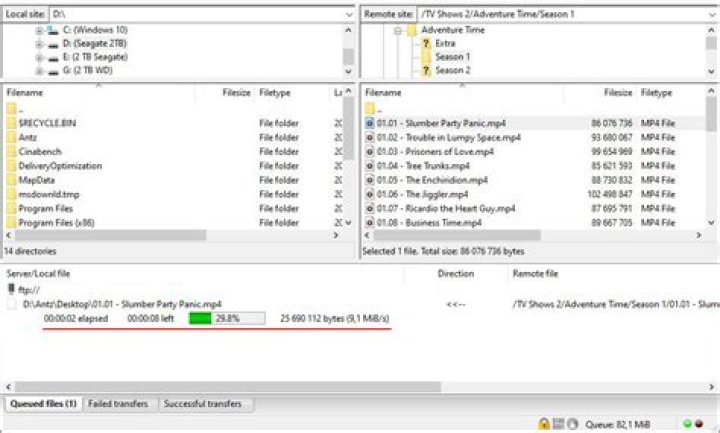
I have a server from where I download big files with the following specs:
- OS: Ubuntu 20.04.2 LTS
- Kernel: 5.4.0-67-generic
- CPU: Intel(R) Xeon(R) CPU E3-1275 v5 @ 3.60GHz
- RAM: 4x16GB DDR4
- Storage: 500GB SSD
- Speedtest: Download: 901.30 Mbit/s // Upload: 768.25 Mbit/s
Using SSH/SFTP
The problem I encounter is that for a few months the transfer speed over single files have slowed down.
I usually download the backups from the server once a week or so, which are 3-5 GB tar files.
For the first 4 months I had the file transfer from the server to my PC around 20-25 MB/s. Now in the last 2 months the file transfer speed dropped to ~1.5MB/s (stays between 1.4 - 1.6 MB/s). I usually download with my PC from Steam with 70-80MB/s, so bandwidth issues wouldn't be a problem.
Haven't done anything on server to the configs, just regular apt-get update & apt-get upgrade
I once had a 30GB file to transfer, and had to wait for around 6 hours.
I've tried to make the file available to transfer via http, but the same 1.5MB/s speed.
I have also other servers with same OS but different kernels, but the problem is the same there, transfering files are limited to 1.5MB/s (and haven't been before - when I installed them and transferred what I needed on them).
I tried using rsync and tar cf - * | pv | netcat ip 7000
Using netcat and pv between the servers showed up to 113MiB/s using this method:
- On destination server:
nc -ulp 5000 > /dev/null - On source server:
pv < /dev/zero | nc -u listener-ip-address 5000
The same netcat and pv between the server which had the big files and my PC using Ubuntu from witin Windows got me 111MiB/s
All transfers are now slow at 1.5MB/s even between the servers and that's pretty annoying, because I can transfer 10 different files and they would all transfer at 1.5MB/s, but if it is only one file, the speed wouldn't increase.
Also disabled firewall for every machine and still same issue.
It may be the IPS but not sure, I think it has something to do with some config which got overwritten and that limits the speed and I don't know which and where would that be.
The ping between PC and the server which has the big files: 42-43ms
The ping between the servers: 36-37ms
The strange thing is that using FileZila/WinSCP on any server limits the transfer speed / file to 1.5MB/s
Also tried FTP between PC and server.
My PC SpeedTest: Download: 750.00 Mbit/s // Upload: 531.99 Mbit/s
Write speeds on servers using:hdparm -Tt /dev/sda
On the one with the big files:
/dev/sda: Timing cached reads: 33094 MB in 1.99 seconds = 16664.27 MB/sec Timing buffered disk reads: 1608 MB in 3.00 seconds = 535.49 MB/secOn the other one where I tried to copy/transfer the file:
/dev/sda: Timing cached reads: 39006 MB in 2.00 seconds = 19533.29 MB/sec Timing buffered disk reads: 1600 MB in 3.00 seconds = 532.77 MB/sec

