Failed to schedule Software Protection service for re-start at 2119-10-19T18:07:58Z. Error Code: 0x80041316
our Windows Server 2012 Essentials is getting evenvwr poluted with the error message bellow and attached every 30 seconds. I've done a lot of research but nothing worked so far, this is what I tried:
Check the NETWORK SERVICE permissions on C:\Windows\System32\Tasks\Microsoft\Windows (it has FULL CONTROL)
checked services and its dependencies and ensure they are running and have startup mode = automatic
checked windows license with slmgr /ato
started and stopped sppsvc service with net stop sppsvc/ net start sppsvc
This is our domain controler so I can't reinstall Windows - Any help please?
Log Name: Application
Source: Microsoft-Windows-Security-SPP
Date: 11/12/2019 1:07:58 PM
Event ID: 16385
Task Category: None
Level: Error
Keywords: Classic
User: N/A
Computer: DC20001811
Description:
Failed to schedule Software Protection service for re-start at 2119-10- 19T18:07:58Z. Error Code: 0x80041316.
Event Xml:
Event xmlns="":
System:
Provider Name="Microsoft-Windows-Security-SPP" Guid="{E23B33B0-C8C9-472C-A5F9-F2BDFEA0F156}" EventSourceName="Software Protection Platform Service" : EventID Qualifiers="49152": 16385 EventID: Version: 0 Version: Level: 2 Level: Task: 0 Task: Opcode: 0 Opcode: Keywords: 0x80000000000000 Keywords: TimeCreated SystemTime="2019-11-12T18:07:58.000000000Z" : EventRecordID: 4441021 EventRecordID: Correlation : Execution ProcessID="0" ThreadID="0" : Channel: Application Channel: Computer: Andromeda.snapd.local Computer: Security : System:
EventData:
Data: 0x80041316 Data: Data: 2119-10-19T18:07:58Z Data: EventData:
Event:
NETWORK SERVICE account has Read permissions
Service is set to use the NETWORK SERVICE account 2
Service is set to use the NETWORK SERVICE account
Task Scheduler service is running
41 Answer
This series of steps worked for me. It is an abbreviated version of this solution.
- Back up all files in the directory
C:\Windows\System32\Tasks\Microsoft\Windows\SoftwareProtectionPlatformjust in case - Add an XML extension to the files in the
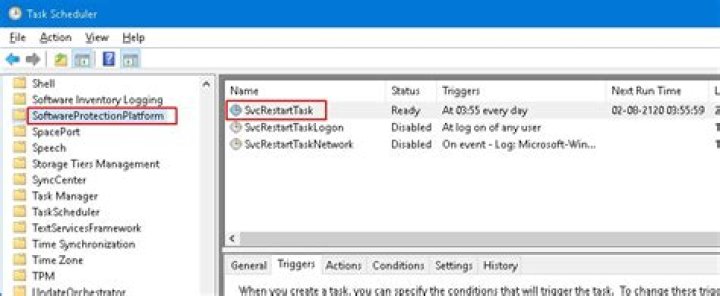
SoftwareProtectionPlatformfolder - Navigate to to Computer Management->System Tools->Task Scheduler->Task Scheduler Library->Microsoft->Windows->SoftwareProtectionPlatform
- Right-click on each task and select Delete
- Right-click on SoftwareProtectionPlatform, Import Task, and import each of the files that you renamed. Don't worry if they don't appear in the Task List.
- Navigate to Computer Management->Services and Applications->Services and restart the Software Protection service
- Check the Event Viewer to verify that the errors have stopped
- Delete the XML files in the
SoftwareProtectionPlatformfolder


