Excel LEN between two symbols
Excel noobie here.
Does anybody know how I could perform the following action ?
In a column, whenever a text string from a cell contains more than x characters, I want it to be highlit through conditonnal formating. The cells look like that content-wise :
"cat|bird bird|dog dog dog"
I'd like cells to be highlit whenever one of the text strings contains more than x characters (a text string in this case being the text separated by a "|" from the other texts in the cell).
I'm pretty sure I need to do something with the LEN function but I don't know how exactly since I need the LEN to apply to every text separated by the "|".
I hope the explanation was precise enough.
02 Answers
If I understand your question correctly then, try below solution in case your version of Excel Supports FILTERXML function. While you did not define value of x, in this example I am setting it to 6.
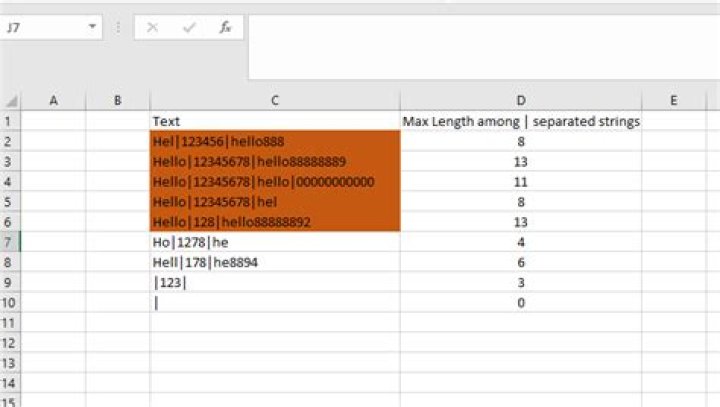
See the below screenshot. Column D is only for reference. It's not used in formula.
Sample data is in Cells C2 to C9
Select Cell C2, go to Conditional Formatting and add a new rule. Put the following formula in it.
=MAX(LEN(TRANSPOSE((FILTERXML("<t><s>"&SUBSTITUTE(C2,"|","x</s><s>")&"x</s></t>","//s"))))-1) > 6Select the formatting of your choice and save the rule. Now use format painter and apply the formatting to all of the intended cells.
FILTERXML creates an Array split by | and MAX & LEN work on the same as an Array when TRANSPOSE is used. The "x" is appended just in case you have all zeros as a string which will be evaluated to number 0 returning Length 1 instead of correct length.
Check this out and let me know if it works for you.
Do this:
Select the data range to highlight
Click Home > Conditional Formatting > New Rule
In the New Formatting Rule dialog, click "Use a formula to determine which cells to format"
enter the formula
=LEN(A2)>15into "Format values where this formula is true", whereA2is the first cell which contains the value, and>15is the criteria to highlight cellsClick the Format button for the Format Cells dialog, and choose the color
Click OK > OK.
For more information with screenshots seeHow to highlight cells based on length of text in Excel?
1

