Copy-Paste text area in GIMP
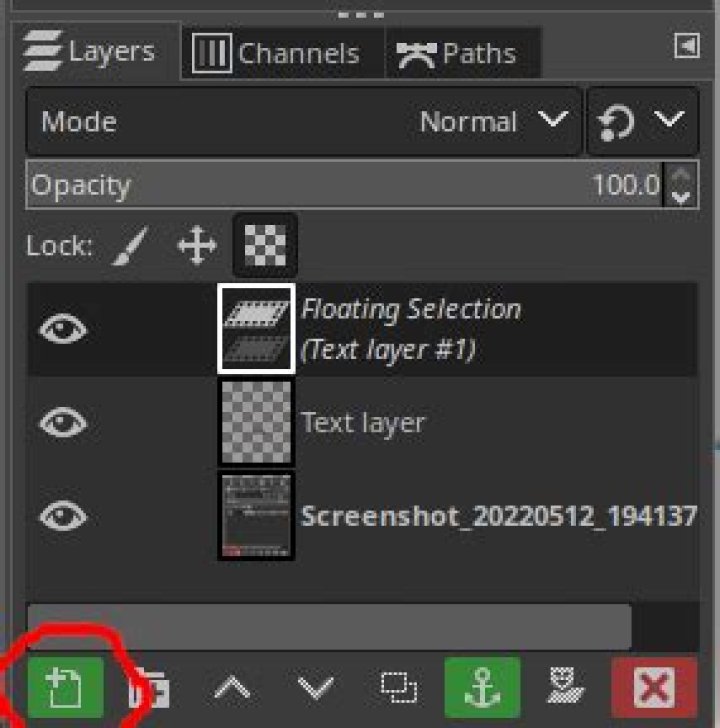
I'm trying to copy-paste a text area into the same image to duplicate it. I don't really mind if it gets pasted into the same layer or another one.
I select the text area, then Ctrl+C, then Ctrl+V.
A floating selection layer is created and if I move the text, it looks "empty" (the original text is black, the new one is white with slim grey edges, as if I was only moving a selection).
I read a bit about floating selections. I thought that clicking outside the selection would merge it into the existing layer. If I do that, the new (pasted) text area just disappears (as if I had just moved a selection). However, if I click "to new layer" in the layer panel, I do get a new layer with the text box in black characters as I expected.
What am I misunderstanding about floating selections and copy-paste?
Is there a better workflow to do a simple copy-paste, something that does not involve right-clicking in the layer panel?
1 Answer
You can click the Create a new layer and add it to the image button at the layers toolbar to create a new layer for your texbox:
The icon to click on the toolbar


