Connect to domain account over VPN
I've just wiped my laptop and reinstalled Windows 8.1 and have connected it to the work domain by connecting to our VPN while logged into a local account.
I'm now trying to log into the laptop using my domain account but Windows can't connect to the domain controller as there is no VPN raised at the time at logging in.
I don't know an awful lot about the VPN itself - I'm connecting to it via the standard Windows VPN client and am using a server address that looks something like
Is there anything I can do besides wait until I'm back in the office on Monday?
5 Answers
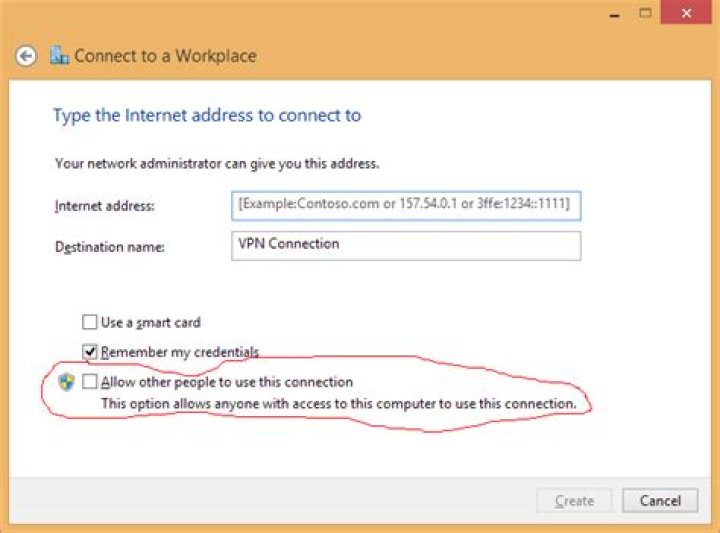
If you can log in with the local administrator account, you can then set a VPN connection to be able to be used by all users. This then enables it to be connected from the login screen so you can contact your DC.
You'll have to create a new VPN connection as an existing one can't be changed to a shared one.
To set up a shared one:
Open the Network and Sharing Centre
Click
Set up a new connection or networkSelect
Connect to a workplaceIf you're asked if you want to use a connection that you already have, select
No, create a new connectionClick
Use my Internet connection (VPN)Fill in the relevant details for the Internet address, and make sure to tick
Allow other people to use this connection- this is what makes it a shared one:Click
Create
On the login screen going forward, you should see a network icon in the lower left. This will switch the screen to logging in over VPN.
3This may work.
- Log in using your local account
- Connect to VPN
- Run notepad as different user (shift + right click on notepad icon > click Run as Different User)
- Enter your work credentials and wait until notepad is launched (this will create a new user profile)
- Log off from Windows
- Log in using your work credentials
Sorry nothing you can do I'm afraid its one of the downsides to client VPN, hardware VPN such as a device in the network that connects to the hardware VPN in the office would work but not client/software based VPN.
Effectively once you log in once Windows caches the credentials and then it does not have to contact the DC each time.
I think the 'pre-login' VPN feature was removed after Windows XP not sure of Microsoft's reasoning for removing this feature tbh.
Thanks
1Still Possible on Win 8 to 10
run gpedit.msc
go to local security policy go to security select interactive logon crt alt del and select disable
the vpn box will appear at logon
This answer may be helpful for those using Windows 10 Pro.
Login as local administrator. Create PPTP network, connect to VPN and join domain.
Reboot. Login as local admin. Connect to VPN using domain account with dial-up access in AD.
Press Ctrl+Alt+Del and select switch user. This will keep you connected to VPN and allow new account to cache on PC.
Windows 7 allowed for PPTP VPN to be connected before login attempt allowing connection to domain for validation of uncached profiles/logins. Too bad we went backwards.


