chat over lan from linux to linux?
As I recall there was something like netsend on windows that allowed simple messages to be sent over the local network. I especially like this because one doesn't need to install extra client soft (hello skype).
Is there something dead simple like this on Linux?
Just to clarify I'm looking for a bash command or simple CLI script/tool, not a GUI app.
8 Answers
You actually can do this with netcat, I believe it is already installed in most cases on linux, and it's dead simple.
On PC 1, type: nc -l 55555
On PC 2, type: nc $IP 55555, where $IP equals the local IP address of PC 1 [e.x. 192.168.2.50]
Once you do this, in the same box, from PC 2, type something and press enter. Then go over and look at PC 1, and your message will be there! It works both ways.
You can also choose a different port than 55555, or if you opened your firewall, you can do this through the internet via your external IP.
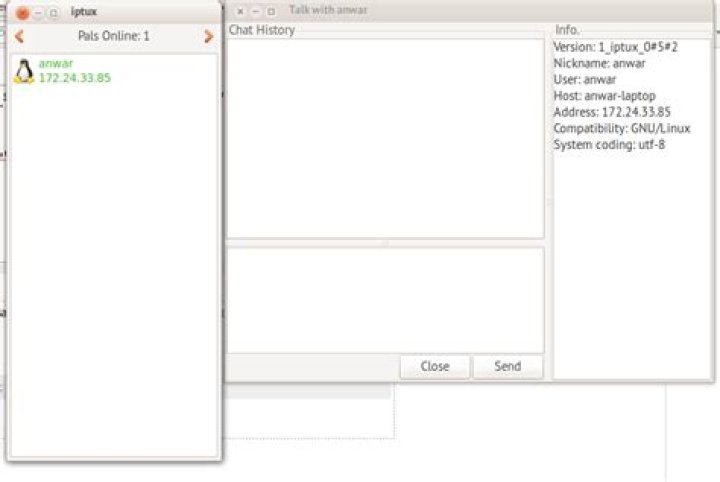
4You can use iptux. It is a very convenient GUI-based program. You can even send files (and entire folder) to your colleague.
From a terminal,
sudo apt-get install iptuxwill do the job.
Here is a screenshot of this tool.
No need for netcat hacks.
The talk (or ytalk - same protocol but newer, multi-user) is a visual communication program which copies lines from your terminal to that of another user. They are probably the closest UNIX equivalent to netsend. An advantage is that communications can be secured by running over ssh.
Packages are in the software repositories. Usage is simply:
talk user@hostMore information here:
Edit: found a screenshot on wikipedia:
Edit again (response to psusi's comment): I'm not sure about Gnome, but KDE will show a popup for a talk request:
One option: if one server has a ssh client installed you could login using ssh and use write.
Empathy supports this, but you need to activate it. It is called people nearby and is a special kind of account which does not require a server. Other than that, it's the same protocol as Facebook and Google uses. Everyone who has activated that will be visible to everyone else on the same network that has also activated it.
4You can do this with finch , the command-line equivalent to pidgin, by setting up local accounts (Bonjour/Avahi). I have not used finch myself, so I cannot guide you in the setup, but it should be fairly easy.
You can use BeeBeep, BeeBEEP is a secure network chat. You can talk and send files with all your friends inside a local area network such of an office, home or internet cafe without a server. Download it from here:BeeBeep
I made a project for this. A Node.js server that has basic chat functionality like /msg. You just run the server and connect with netcat.
However, it's terrible in it's current form. I might rewrite it in the near future. You will only have to watch the repo and git pull when it's updated.


