Can I see a list of gyms I left a pokemon at?
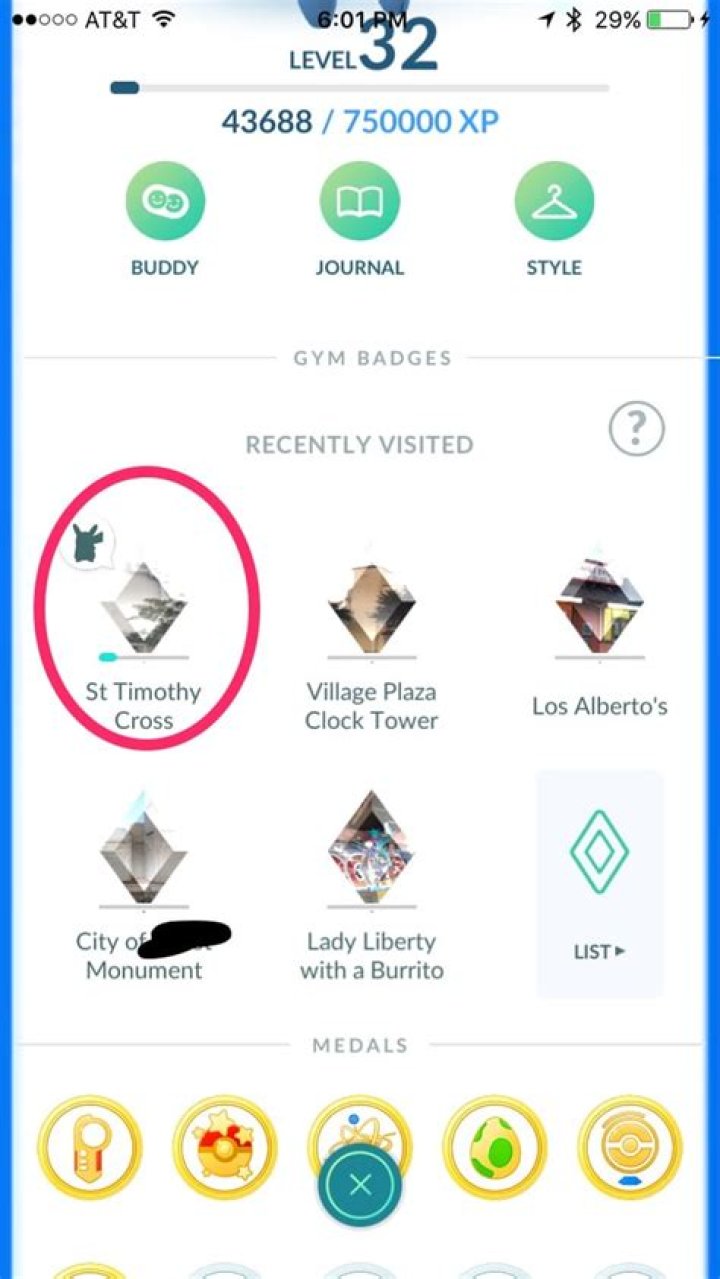
I captured a gym today just before the servers went down. I am wondering if I lost my progress. Is there a way to see if I own a gym or not?
24 Answers
As of today, there is finally a way to see what gyms you have Pokémon occupying!
If you go to your trainer profile after visiting gyms, there will be a list of gym badges you've earned. There is an indicator next to the gyms that currently have one of your Pokémon occupying it:
If you tap on this gym badge, it will show what Pokémon you have defending that gym as well as how long that Pokémon has been defending the gym for.
If you keep personal track of which Pokemon you left where, then yes. The game shows a colored icon above one of your Pokemon if it's at a gym, but not which gym it is. You could also monitor which Pokemon you have at 1hp. Additionally, the icon in the top-right of the Shop (which you use to claim rewards for holding gyms) tells you the number of gyms you control.
1A good little trick is rename your pokemon with the gyms location.
Change:
"Ponyta" to "Town Hall"
"Rhydon" to "College University"
"Rattata" to "University Cafe"
This way when a gym you own is taken down, you know which one it is.
1You can see in your Pokemon screen which of your pokemon are assigned to a gym. They will have the gym symbol over the image of the pokemon. That's the best you'll get as there's currently no way to see occupied gyms.