Can I enable "Import pictures and videos" in Windows 10 AutoPlay?
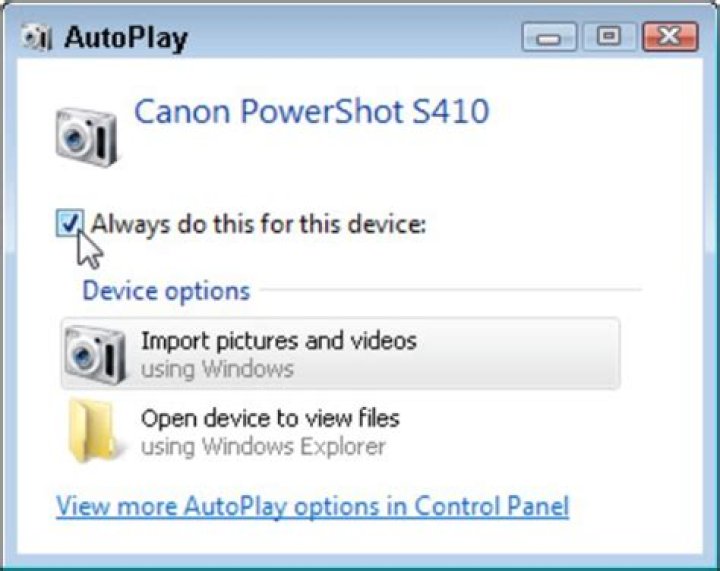
In Windows 7, when you plugged in an external camera, then you could select an AutoPlay setting entitled "Import pictures and videos":
which launched a rather simple (but effective) tool to import, rotate and (optionally) delete your photos:
In Windows 10, Microsoft decided not to make the "Import pictures and videos" option available in AutoPlay and, instead, offer the built in Windows 10 "photos" app.
However you can right-click on a portable device from Windows Explorer and select "Import pictures and videos" that way.
My question is: Is there any way to make the "Import photos and videos" wizard appear as an option in the Windows 10 AutoPlay settings? I'm lazy and don't want to keep having to do it from the Windows Explorer.
13 Answers
In June 2020, this Super User page is at the top of the Google search results for "restore import pictures and videos autoplay option in windows 10".
I just followed this procedure in Windows 10 feature version 2004 and this still works:
To add "Import Pictures and Videos (Windows)" to the Windows 10 AutoPlay options list for devices like digital cameras:
Run As Administrator these three commands in a batch file or run them individually in an elevated Command Prompt window:
cd "C:\Program Files (x86)\Windows Photo Viewer"
regsvr32 PhotoAcq.dll
regsvr32 PhotoViewer.dll
Source:
0Perhaps it depends upon the device you are connecting to Windows 10? As an example, the following is a screenshot of the same Windows 10 interface you referenced above, taken from within my wife's profile. As you can see, she has her iPhone set to utilize AutoPlay with the option to Import photos and videos (Photos) enabled:
Additionally, you can navigate to the AutoPlay applet in the Control Panel and configure it there, along with audio and video disc options that aren't available within the Settings -> Devices -> AutoPlay interface:
(Source)
2you can make a link to "C:\Program Files\Windows Live\Photo Gallery\WLXPhotoAcquireWizard.exe" and that will allow you to import pictures from any usb device
1

