Audio is not working correctly in kubuntu 20.10
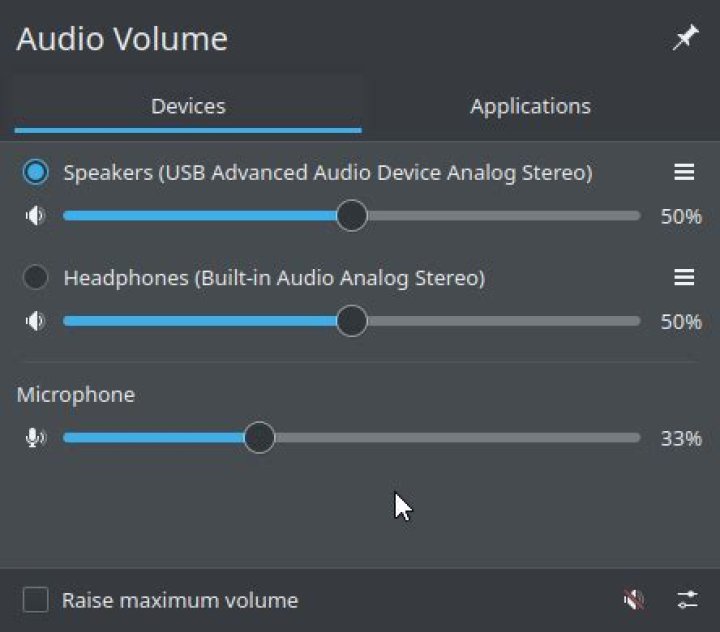
Can someone help me understand why my sound is being weird?
I reset pulse audio using
rm -f ~/.config/pulse/*
sudo killall pulseaudio
and it works but then I have a bunch of duplicate devices which is confusing
Then if I run pavucontrol and goto configuration and set USB Advance Audio Device from... Analog Stereo Duplex to.. Analog Stereo Output.. I get no sound but my sound settings looks like they should...
Then when I reboot my settings reset to not working and a bunch of generic audio devices and I have to do...
rm -f ~/.config/pulse/*
sudo killall pulseaudio
again.
I only have two audio related things plugged in to my pc, my speakers which is plugged into the headphone jack in the front due to broken ports in the back and a USB fifine microphone k678 which contains a female headphone jack in it.
I am using kubuntu 20.10 btw
EDIT
So this seems to have solved my device issues but the system still doesn't save my audio settings when I reboot.
This can be a issue due to the fact I use my headphone jack as my speaker output.
It makes it so I have to manually change back to headphones every time I start up my computer.
EDIT2
looks like it went back to being generic devices again.
this time its only one.


