Allow users to create files but not edit and delete them
Is it possible to allow users creating new files inside a folder but not modifying them?
I'm trying to set such permissions but the problem is that when I disable write attributes and write extended attributes, users can't create files.
Users can't create files inside this folder, but, they can modify them. I want opposite.
2 Answers
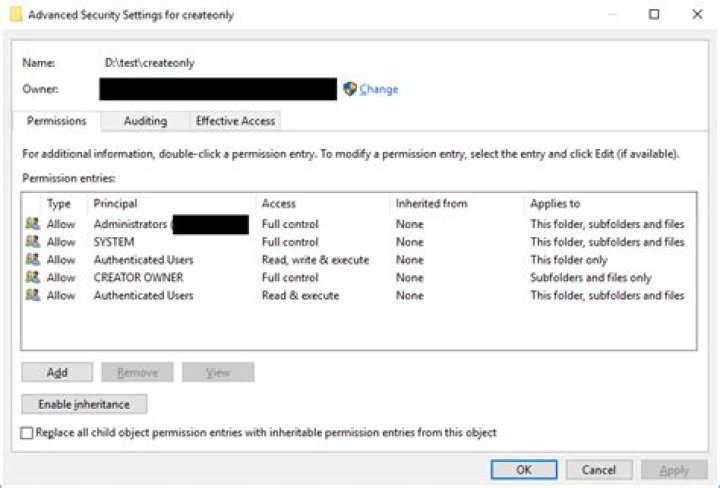
Open the Advanced Security Settings window, disable inheritance clearing all the entries, and add these:
- Allow Administrators "Full control" on "This folder, subfolders, and files"
- Allow SYSTEM "Full control" on "This folder, subfolders, and files"
- Allow Authenticated Users the basic permissions "Read & execute", "List folder contents", "Read", and "Write" to "This folder only"
- Allow CREATOR OWNER "Full control" to "Subfolders and files only"
- Allow Authenticated Users the basic permissions "Read & execute", "List folder contents", and "Read" to "This folder, subfolders, and files"
The magic happens in the fourth bullet, where we add permissions for CREATOR OWNER. When inherited by new files, that entry will be changed into one that applies to the creator. You can skip the final bullet if you don't want everyone to be able to read all the files.
To verify that the ACLs were entered correctly, here's the output of icacls on the folder:
BUILTIN\Administrators:(OI)(CI)(F)
NT AUTHORITY\SYSTEM:(OI)(CI)(F)
NT AUTHORITY\Authenticated Users:(RX,W)
CREATOR OWNER:(OI)(CI)(IO)(F)
NT AUTHORITY\Authenticated Users:(OI)(CI)(RX)I removed 'Delete' permission from the selected user group for the "folder and all sub-folders and files", and that gave me exactly what you asked for.
Since a modify operation is actually a copy-delete-reWrite operation, removing the delete removes both the ability to Delete files and Modify files.
I hope this easy answer will help someone.
1

